top of page

On-Demand Webinars

Why They Matter, What You Gain, and How to Create Yours
Introduction
On-demand webinars allow Premium providers to reach new users and build trust at scale. A single well-crafted webinar can help you:
Educate users before they meet you
Showcase your expertise 24/7 — your video is drawing clients to you even when you are sleeping
Attract high-intent leads
On-demand webinars position you as an authority and help prospects quickly understand why you matter.
What Are On-Demand Webinars?
On-demand webinars are pre-recorded videos that users can watch anytime.
They help you:
• Explain topics you specialise in
• Build credibility and trust
• Guide users to your services
• Show the quality of your advice before you even speak to them

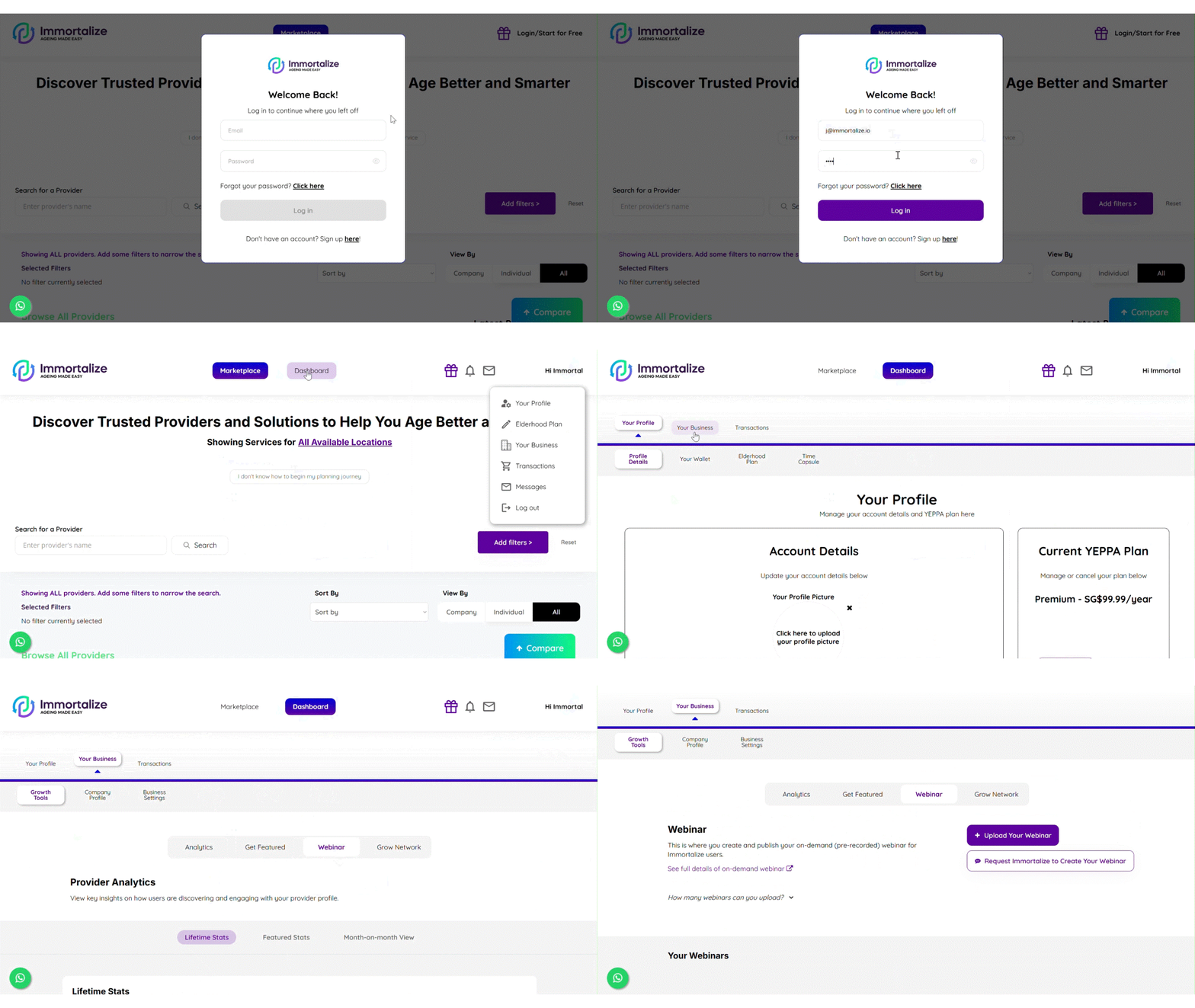
How to Create On-Demand Webinars on Immortalize
2
In your provider dashboard page, go to:
Your Business → Growth Tools → Webinar

Here, you’ll see two ways to create your on-demand webinar:
Option B
Option A

Two Ways to Create Your On-Demand Webinar
Option A:
Immortalize Creates Your Webinar
Every Premium provider receives one complimentary on-demand webinar produced by Immortalize.
More can be requested for a fee.
How it works:
-
Submit a short form with your topic and speaker details
-
Immortalize reviews your submission
-
We contact you to confirm details and schedule a recording
-
Immortalize records, edits, and prepares your webinar
-
We upload it to your webinar dashboard
This option is ideal if you want a polished, professional video.
Option B:
Upload Your Own Pre-Recorded Webinar
You can upload as many of your own videos as you like.
Your video must:
-
Be created and owned by you
-
Match your expertise
-
Connect to at least one of your offerings
-
Be accurate and clear
-
Have clear audio and video
-
Follow Immortalize guidelines
When you click “Upload Your Webinar,” a form will appear for you to complete. Submit your video link through the form for review.
If you choose Option A, Immortalize handles:
Editing
-
Adding subtitles
-
Highlighting key points
-
Creating a short promotional clip
Publishing
-
Full video uploaded to the Immortalize platform
-
Promotional clip posted on YouTube and social media channels
Review & Approval Process
Every webinars follow the same review checks
We review for:
-
Relevance to your offerings
-
Accuracy
-
Clear explanation
-
Audio and video quality
-
Professional presentation
-
Compliance with Immortalize guidelines
Possible outcomes:
-
Approved → Published
-
Minor edits required → Feedback given
-
Major issues / rejected → Instructions provided
.png)
Once approved, you will receive an email notification. You can then proceed to customize your webinar sign-up form.
Customising Your Sign-Up Form
Users must complete a sign-up form before watching your webinar
Default fields:
-
First Name
-
Last Name
-
Email
-
Phone Number
You can add extra mandatory text fields if you want additional information from users. Sign up forms are customized under the Webinar Tab.


*The sign up form that the users will see
How Users Discover and Watch Your Webinars
Where They Appear
1
Your provider profile
.png)
2
Elderhood Checklist (where applicable)

User Journey
User browses on-demand webinars page or find it through our social media posts
Select yours
Fills in the sign-up form
Receives a confirmation email
Watches your webinar
Sees your offerings displayed below the video

Your webinar helps users understand your value before contacting you.
Visibility Rules
Webinar visibility follows your provider profile’s visibility
If your profile is unlisted
All your webinars become unlisted.
If your profile is listed
All your webinars become listed.
Note: For providers with company and individual provider profiles, both profiles have to be listed before the webinars are listed.
bottom of page